Query Caching
The query cache stores entity query results to avoid redundant database round-trips in long-running applications (Blazor, WPF). It implements a stale-while-revalidate pattern: return cached data immediately, then refresh in the background if the data is stale.
The cache is off by default. To enable it, set options.Caching.WritePolicy to something other than WritePolicy.Disabled as well as replacing any LoadEntityAsync() overrides in DisplayController subclasses.
Overview
Standard reifying operators (.ToList(), .SingleOrDefault(), etc.) load fresh data every time. This is inefficient when the same data is accessed repeatedly:
- Viewing a list, then editing an item from that list
- Multiple UI components querying the same reference data
- Navigating back to previously viewed data
The cache stores query results in memory and optionally on disk. When data changes, the cache is updated automatically via save operations and background refresh.
Basic Usage
Simple Queries
Add .Cached() before the reifying operator:
// Without caching
var users = await User.Query(ctx)
    .Where(u => u.Active)
    .ToListAsync();

// With caching
var result = await User.Query(ctx)
    .Where(u => u.Active)
    .Cached()
    .ToListAsync();

// Access the data
foreach (var user in result.Value)
{
    Console.WriteLine(user.Name);
}

// Check if data came from cache
if (result.State == ResultState.Stale)
{
    Console.WriteLine("From cache, background refresh in progress");
}
Available Operators
The .Cached() extension method supports these async operators:
.ToListAsync()- ReturnsCacheResult<List<T>, List<T>>.SingleOrDefaultAsync()- ReturnsCacheResult<T?, T>.CountAsync()- ReturnsCacheResult<int, int?>(the update type is nullable so thatnullcan signal a validation-only update)
Subscribing to Updates
Update handlers are called when cached data is refreshed:
var result = await User.Query(ctx)
    .Where(u => u.Active)
    .Cached()
    .ToListAsync();

result.AddUpdateHandler(updatedUsers =>
{
    // Called when data is refreshed from database
    // updatedUsers is null for validation-only updates (no data change)
    if (updatedUsers != null)
    {
        RefreshUI(updatedUsers);
    }
});
The update parameter is null when only the validation timestamp was updated (data identical) and non-null when the data actually changed (entity version changed, list membership changed). This prevents handlers from performing expensive operations for validation-only updates.
Update handlers are held by weak reference: the cache does not keep your handler delegate alive, so a handler is automatically cleaned up once the code that registered it stops referencing the delegate (e.g. when the subscribing component is garbage collected). Keep a reference to the delegate for as long as you want updates.
Entity Collections
Collections (or other IEntitySets) can be loaded via cache:
// Collection will be updated if a refresh is necessary
farm.Dogs.CollectionChanged += (s, e) =>
{
    RefreshDogList();
};

// Load collection using cache
await farm.Dogs.LoadCachedAsync();

// Check if data was stale and will be refreshed
if (farm.Dogs.CacheState == ResultState.Stale)
{
    Console.WriteLine("Collection loaded from cache, refreshing...");
}

InitDogList();
Key Features:
CacheStateproperty indicates freshness (Fresh,Stale,Uncached)- Updates automatically marshalled to UI thread (WPF, Blazor)
- Local modifications preserved (cache updates skipped if collection changed)
- Standard
CollectionChangedevent for all updates
Typical Usage:
// WPF/Blazor component loading related data
protected override async Task OnInitializedAsync()
{
    customer.Orders.CollectionChanged += OnOrdersRefreshed;
    await customer.Orders.LoadCachedAsync();
    if (customer.Orders.CacheState == ResultState.Stale)
    {
        IsRefreshing = true; // Show loading indicator for background refresh
    }
}

private void OnOrdersRefreshed(object? sender, NotifyCollectionChangedEventArgs e)
{
    IsRefreshing = false;
    customer.Orders.CollectionChanged -= OnOrdersRefreshed;
    StateHasChanged(); // Blazor
}
Entity References
Reference properties (one-to-one or many-to-one relationships) can be loaded via cache:
// Reference will be updated if a refresh is necessary
farm.Properties.Owner.ValueChanged += (s, e) =>
{
    RefreshOwnerUI();
};

// Load reference using cache
var owner = await farm.Properties.Owner.GetCachedAsync();

// Check if data was stale and will be refreshed
if (farm.Properties.Owner.CacheState == ResultState.Stale)
{
    Console.WriteLine("Reference loaded from cache, refreshing...");
}

DisplayOwner(owner);
Key Features:
- Returns the referenced entity (or null if no value)
CacheStateproperty indicates freshness (Fresh,Stale,Uncached)- Updates automatically marshalled to UI thread (WPF, Blazor)
- Local modifications preserved (cache updates skipped if reference changed)
- Standard
ValueChangedevent for all updates
Typical Usage:
// WPF/Blazor component loading related entity
protected override async Task OnInitializedAsync()
{
    order.Properties.Customer.ValueChanged += OnCustomerRefreshed;
    var customer = await order.Properties.Customer.GetCachedAsync();
    DisplayCustomer(customer);

    if (order.Properties.Customer.CacheState == ResultState.Stale)
    {
        IsRefreshing = true; // Show loading indicator for background refresh
    }
}

private void OnCustomerRefreshed(object? sender, EventArgs e)
{
    IsRefreshing = false;
    order.Properties.Customer.ValueChanged -= OnCustomerRefreshed;
    StateHasChanged(); // Blazor
}
Result States
ResultState indicates data freshness:
Fresh: Data is current, no background refresh neededStale: Showing cached data, background refresh in progress (update handler will be called)Uncached: Data not from cache, no updates will occur (e.g., uncacheable query)
A time-dependent query is never Fresh.
Advanced Features
Include() Support
Queries with .Include() are cached by decomposing into separate queries per entity type:
var result = await Dog.Query(ctx)
    .Where(d => d.Active)
    .Include(d => d.BestFriend)
    .Include(d => d.Owner)
    .Cached()
    .ToListAsync();

// Dog entities cached separately from Human entities
// Subsequent queries may hit cache for some entities
Optimised Pagination Support
Queries with .OrderBy()/.ThenBy() and optionally .Skip()/.Take() can be cached as views - in-memory transformations of base cached data:
// First query: Loads all countries and caches
var byName = await Country.Query(ctx)
    .OrderBy(c => c.Name)
    .Cached()
    .ToListAsync();

// Second query: Transforms cached data (no database query)
var byCode = await Country.Query(ctx)
    .OrderBy(c => c.Code)
    .Cached()
    .ToListAsync();

// Third query: Paginated view (transforms cached data)
var page = await Country.Query(ctx)
    .OrderBy(c => c.Population)
    .Skip(20)
    .Take(10)
    .Cached()
    .ToListAsync();
How It Works:
- First ordered query executes and caches both the sorted result and the full dataset
- Subsequent queries with different ordering sort the cached data in memory (fast)
- Pagination (Skip/Take) works on cached ordered data without database queries
- When entities change, cache updates or invalidates based on whether sort keys changed
Limitations:
- Only attribute access supported (
c => c.Name, notc => c.Enemy.Name) - Must have at least one
.OrderBy()clause (Skip/Take alone doesn't enable this optimization)
Cache Control
Control cache behavior using the Requirements property:
// Accept stale data (default - stale-while-revalidate)
var stale = await User.Query(ctx)
    .Cached()  // or .Cached(new() { Requirements = ResultState.Stale })
    .ToListAsync();

// Wait for fresh data (according to ReadPolicy)
var fresh = await User.Query(ctx)
    .Cached(new() { Requirements = ResultState.Fresh })
    .ToListAsync();

// Bypass cache completely, force database query, repopulate cache
var uncached = await User.Query(ctx)
    .Cached(new() { Requirements = ResultState.Uncached })
    .ToListAsync();
Use ResultState.Uncached for:
- User-initiated refresh actions
- Debugging cache-related issues
- Force cache repopulation after external data changes
Force Revalidation of Fresh Data
Use StaleBefore to request revalidation of cached data older than a specific timestamp:
// Capture timestamp when screen opens
var screenOpenedAt = DateTime.Now;

// Later queries request revalidation of data cached before screen opened
var result = await User.Query(ctx)
    .Where(u => u.Active)
    .Cached(new() { StaleBefore = screenOpenedAt })
    .ToListAsync();
How it works:
StaleBeforeis passed toReadPolicyas amaxAgeconstraintReadPolicy.Client(TimeSpan)applies that constraint when determining freshness- For master data, the effective freshness window becomes the shorter of the configured leeway and
maxAge - Example: With 1-hour leeway and
StaleBefore = DateTime.Now, the effective freshness window becomes 0, forcing revalidation
Use cases:
- Search screens: Set
StaleBefore = DateTime.Nowat screen creation to guarantee initial revalidation - Sub-criteria searches: Pass parent search timestamp to ensure consistent results
- User-initiated "refresh" actions: Use
Requirements = ResultState.Uncachedinstead (bypasses cache entirely)
Why not just use ResultState.Fresh?
Freshrespects theReadPolicyleeway period- Data cached 30 seconds ago with 1-hour leeway is considered Fresh, no revalidation
StaleBeforeoverrides this: "I want data no older than X, regardless of leeway"
Priority Control
Query execution can be prioritized when multiple queries are pending:
// Lowest priority - background preload
_ = Task.Run(async () =>
{
    await Country.Query(ctx)
        .Cached(new RequestOptions { Priority = RequestPriority.Preload })
        .ToListAsync();
});

// Highest priority - user-initiated action executes first
var result = await User.Query(ctx)
    .Where(u => u.ID == selectedID)
    .Cached(new RequestOptions { Priority = RequestPriority.Interactive })
    .SingleOrDefaultAsync();
Priority levels: Preload (0), Refresh (1), Default (2, default), Interactive (3)
Manual Cache Control
For fine-grained control, you can manually add or remove entities and queries from the cache:
Preloading Entities
Add entities directly to the cache without executing a query:
// Load entities you know you'll need
var countries = await Country.Query(ctx).ToListAsync();

// Add to cache for future requests
services.Persistence.Cache.Add(countries);

// Later queries hit the cache
var cached = await Country.Query(ctx)
    .Where(c => c.ID == selectedID)
    .Cached()
    .SingleOrDefaultAsync();
// Returns cached data immediately (Stale state)
Preloading Queries
Add queries to execute in the background and populate the cache:
// Preload reference data on application startup
services.Persistence.Cache.Add([
    Country.Query(ctx),
    Currency.Query(ctx),
    Language.Query(ctx)
]);

// Queries execute in background
// Results available when UI components request them
This is useful for:
- Warming the cache on application startup
- Preloading data before navigating to a screen
- Batch loading related entities
Removing from Cache
Remove entities when you know they're stale (e.g., external update notifications):
// By entity ID
services.Persistence.Cache.Remove(userId);

// Multiple entities
services.Persistence.Cache.Remove(new[] { id1, id2, id3 });

// By entity instance
services.Persistence.Cache.Remove(user);

// Next query will fetch fresh data
var user = await User.Query(ctx)
    .Where(u => u.ID == userId)
    .Cached()
    .SingleOrDefaultAsync();
// Executes database query (cache miss)
Note: The cache is automatically updated when entities are saved, so manual removal is typically only needed for external changes or when explicitly invalidating stale data.
Configuration
Enabling the Cache
The cache is disabled by default in desktop applications. To enable it, set WritePolicy to something other than Disabled:
var services = new The.Composition.Builder()
    .RegisterMetadata(Entities.Metadata)
    .RegisterEntityStore(entityStore)
    .RegisterAuthentication(authentication) // et cetera
    .Configure(options =>
    {
        // enables both in-memory caching and persistent caching for reference data
        options.Caching.WritePolicy = WritePolicy.Client;
    })
    .Build();
In web applications, the cache is enabled by default, but server-side applications use a shared cache with no persistent storage and all data revalidated eventually.
The .Cached() extension method is always usable, but doesn't actually read from or write to the cache until caching is enabled — otherwise it just executes the query. Once enabled, the cache uses a memory-based LRU (least-recently-used) eviction policy to manage memory usage.
Basic Configuration Options
Use the .Configure() method to customize cache behavior:
var services = new The.Composition.Builder()
    .RegisterMetadata(Entities.Metadata)
    .RegisterEntityStore(entityStore)
    .RegisterAuthentication(authentication) // et cetera
    .Configure(options =>
    {
        // configure storage policy (Server enables caching, but only in-memory)
        options.Caching.WritePolicy = WritePolicy.Server;

        // configure freshness policy (default: Client with 5 minute leeway)
        options.Caching.ReadPolicy = ReadPolicy.Server;

        // set memory limit (default: 512 MB)
        options.Caching.MaxCacheSize = 256L * 1024 * 1024; // 256 MB

        // set compaction threshold (default: 80% of MaxCacheSize)
        options.Caching.CompactToPercentage = 0.9; // Compact to 90%

        // set batch size for query execution (default: 100)
        options.Caching.FetchBatchSize = 50;

        // set timeout for cache reads (default: null/infinite)
        options.Caching.FetchSubmitTimeout = TimeSpan.FromSeconds(30);

        // set persistent cache flush delay (default: 1 minute)
        options.Caching.FlushDelay = TimeSpan.FromMinutes(5);
    })
    .Build();
Policies
Two policies control cache behavior:
ReadPolicy - When is cached data considered fresh?
ReadPolicy.Client(TimeSpan leeway)(default: 5 minutes)
Reference data stays fresh indefinitely, master data goes stale after the leeway period. WhenRequestOptions.StaleBeforeis used, the effective leeway becomesMin(leeway, now - staleBefore).ReadPolicy.SharedClient(TimeSpan leeway, TimeSpan referenceLeeway)
LikeClient, but reference data also expires (afterreferenceLeeway) instead of staying fresh indefinitely. Use this when one cache is shared between principals or circuits (Blazor Server), where background revalidation is the only way another instance's changes become visible. When using this policy, also setoptions.Caching.AuthoriseCacheHits = trueso that a cache hit reproduces the store's tenancy and permission checks instead of serving another principal's data. The web server composition (AddTheFramework()) applies both automatically — see Sharing Cache Between Instances.ReadPolicy.Server
All data stays fresh for the request/scope lifetime (suitable for request/response apps)ReadPolicy.Conservative
All data goes stale immediately (continuous revalidation)
.Configure(options =>
{
    // Reference data cached indefinitely, master data for 10 minutes
    options.Caching.ReadPolicy = ReadPolicy.Client(TimeSpan.FromMinutes(10));

    // Or: Everything fresh for the request
    options.Caching.ReadPolicy = ReadPolicy.Server;

    // Or: Always revalidate
    options.Caching.ReadPolicy = ReadPolicy.Conservative;
})
WritePolicy - Where is data cached?
WritePolicy.Disabled(default)
No caching - queries execute normally (still benefit from batching/deduplication)WritePolicy.Server
All data cached in memory only (suitable for request/response apps)WritePolicy.Client
Reference data in memory + disk, master data in memory only (suitable for interactive apps)
.Configure(options =>
{
    // Memory-only caching
    options.Caching.WritePolicy = WritePolicy.Server;

    // Or: Memory + disk for reference data
    options.Caching.WritePolicy = WritePolicy.Client;
})
Custom Policies
Both ReadPolicy and WritePolicy support custom logic per entity type:
Custom ReadPolicy
Define freshness rules based on entity type, entry age, and maximum age constraint:
.Configure(options =>
{
    options.Caching.ReadPolicy = ReadPolicy.Custom((entityInfo, entryAge, maxAge) =>
    {
        // Countries stay fresh for 1 hour (respecting StaleBefore constraint)
        if (entityInfo.EntityName == "Country" && entryAge < TimeSpan.FromHours(1) && entryAge <= maxAge)
        {
            return ReadOutcome.Fresh;
        }

        // Reference data stays fresh for 30 minutes (respecting StaleBefore constraint)
        if (entityInfo.IsReferenceData && entryAge < TimeSpan.FromMinutes(30) && entryAge <= maxAge)
        {
            return ReadOutcome.Fresh;
        }

        return ReadOutcome.Stale;
    });
})
Parameters:
entityInfo: Entity metadata (entity name, IsReferenceData, etc.)entryAge: Time since the cache entry was last updatedmaxAge: Maximum acceptable age (derived fromRequestOptions.StaleBeforeif set, otherwiseTimeSpan.MaxValue)
Custom WritePolicy
Control storage location per entity type:
.Configure(options =>
{
    options.Caching.WritePolicy = WritePolicy.Custom(entityInfo =>
    {
        // Don't cache audit logs
        if (entityInfo.EntityName == "AuditLog")
        {
            return WriteOutcome.None;
        }

        // Persist reference data to disk
        if (entityInfo.IsReferenceData)
        {
            return WriteOutcome.Persistent;
        }

        // Cache master data in memory only
        return WriteOutcome.Transient;
    });
})
Persistent Cache (Disk Storage)
When using WritePolicy.Client or a custom policy returning WriteOutcome.Persistent, reference data can be persisted to disk across application restarts.
Setup:
var services = new The.Composition.Builder()
    .RegisterMetadata(Entities.Metadata)
    .RegisterEntityStore(entityStore)
    .RegisterAuthentication(authentication)
    .RegisterCacheStore(new AppDataCacheStore())
    .Configure(options =>
    {
        // Enable persistent caching
        options.Caching.WritePolicy = WritePolicy.Client;

        // Configure flush delay (default: 1 minute)
        options.Caching.FlushDelay = TimeSpan.FromMinutes(5);
    })
    .Build();
Built-in Implementations:
AppDataCacheStore- Stores in user's AppData folder, under a directory named for the applicationLocalStorageCacheStore- Browser localStorage (Blazor WebAssembly), under a key ending in the application's name
Custom Storage:
Implement ICacheStore for custom storage backends (database, cloud, etc.):
public interface ICacheStore
{
    CacheFile Get(string appName);            // Load at startup
    void Set(string appName, CacheFile file); // Save (debounced by FlushDelay)
    void Clear(string appName);               // Remove persisted cache data
}
Every call is given Options.AppName (defaulting to the entry assembly's name), which outside production has the environment name appended - MyApp (Test). Keying storage by that name keeps each environment's cache to itself: AppDataCacheStore names its directory for it, and LocalStorageCacheStore appends it to the storage key as the.cache.MyApp.Test.
Memory Management
Control cache memory usage with size limits:
.Configure(options =>
{
    // Maximum memory usage before eviction (default: 512 MB)
    options.Caching.MaxCacheSize = 512L * 1024 * 1024; // 512 MB

    // Target size after compaction as percentage of MaxCacheSize (default: 0.8 = 80%)
    options.Caching.CompactToPercentage = 0.8;
})
How It Works:
- Cache tracks memory usage of cached entities (plus overhead)
- When adding an entry would exceed
MaxCacheSize, entries are evicted using prioritized LRU - Eviction priority: Synthetic/speculative entries first, then the results of
.Cached()queries, then explicitlyAdd()ed data, thenWritePolicy.Persistentdata last - Within each priority tier, least-recently-used entries are evicted
- Eviction continues until total size drops below
MaxCacheSize * CompactToPercentage
Tuning Guidance:
- Set based on available memory and expected working set size
- Too small: cache thrashing (frequent evictions reduce effectiveness)
- Too large: memory pressure and garbage collection overhead
- Application-specific tuning recommended based on entity sizes and query patterns
Sharing Cache Between Instances
Web Applications (ASP.NET Core):
By default, AddTheFramework() creates a shared cache instance used by all HTTP request scopes:
// Blazor Server / ASP.NET Core
builder.Services.AddTheFramework(); // Automatic shared cache
This allows:
- One request's queries populate cache for subsequent requests
- Reduced memory usage (single cache vs. per-request caches)
- Consistent LRU eviction across all requests
Because this cache is shared across principals, AddTheFramework() also configures it for safe
cross-principal use: ReadPolicy.SharedClient (so no data — reference data included — stays fresh
indefinitely, since background revalidation is the only way another principal's changes become
visible) together with options.Caching.AuthoriseCacheHits = true (so a cache hit reproduces the
store's tenancy and permission checks rather than leaking another principal's data). If you build a
shared cache manually with The.Composition.Builder, set both of these yourself.
Single-User Clients (WPF, Blazor WASM):
A private cache — one per framework instance, without AuthoriseCacheHits — serves one user at a
time, and the framework keeps it that way across logins: when the session changes identity
(SecurityService.LogoutAsync(), a failed LoginAsync(), or LoginAsync() as a different user),
the cache is automatically reset to its preload tier. Reference data is re-seeded from the
.theCache file, which is not cleared; everything else is refetched on demand under the new user.
Same-identity relogins keep the cache intact. No configuration is needed, and enabling
AuthoriseCacheHits on a single-user client just to guard logout is unnecessary.
On logout the reset completes in the background, after all PrincipalChanged handlers have run —
so the session's teardown finishes before the wipe. Services.Security.QuiesceAsync() awaits it if
you need a hard boundary. A login as a different user always resets before it completes.
Custom Sharing:
AddTheFramework() manages its own shared cache instance. If you need to supply a specific SharedCache, use The.Composition.Builder directly and continue registering the rest of your services before Build():
// Create shared cache
var sharedCache = new SharedCache(new CachingOptions
{
    MaxCacheSize = 1024L * 1024 * 1024 // 1 GB
});

var builder1 = new The.Composition.Builder()
    .RegisterSharedCache(sharedCache);

var builder2 = new The.Composition.Builder()
    .RegisterSharedCache(sharedCache);
Pass an ICacheStore as the second SharedCache constructor argument if you also want shared persistent storage.
Isolated Caches:
Create separate cache instances (e.g., for testing):
// Each instance has its own cache
var builder = new The.Composition.Builder()
    .RegisterSharedCache(new SharedCache(new CachingOptions()));

// Or disable caching entirely
var builder = new The.Composition.Builder()
    .RegisterSharedCache(null);
How It Works
Hierarchical Cache Keys
First, queries are converted to filter levels:
- One: Single entity by ID (
Where(e => e.ID == guid)) - All: All entities of a type (no filters)
- Some: Filtered queries (compared by expression tree structure)
This enables partial fills: if all entities are cached, single-entity queries hit the cache without querying the database.
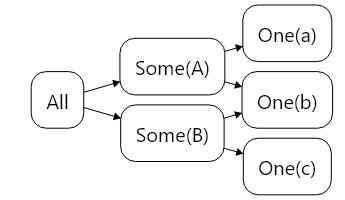
The filter levels are then decomposed further into cache keys:
OneKey: Identifies a single entity by type name and ID
- Example:
Userwith ID{12345678-...} - Used for
.Where(u => u.ID == guid)queries - Automatically populated when a ManyKey query fetches entities
- Example:
AllKey : ManyKey: Identifies all entities of a type
- Example: All
Countryentities - Used for queries with no filters
- Hierarchically contains all OneKey entries for that type
- Example: All
SomeKey : ManyKey: Identifies filtered queries by entity type and expression tree structure
- Example:
.Where(u => u.Active && u.Department == "Sales") - Expression trees are compared structurally (same predicates = same key)
- Constant values in predicates affect the key (different values = different keys)
- Example:
ViewKey : ManyKey: Identifies sorted/paginated transformations of a base ManyKey query
- Example:
Country.Query(ctx).OrderBy(c => c.Name).Skip(20).Take(10) - Contains: base query key + ordering specifications + skip/take values
- Enables in-memory transformation without re-querying the database
- Example:
How Views Work
ViewKeys represent in-memory transformations of cached data:
Pattern Recognition:
The cache recognizes queries with .OrderBy(), .ThenBy(), .Skip(), and .Take() as view candidates:
// Base query caches all countries
var all = await Country.Query(ctx).Cached().ToListAsync();

// ViewKey: sorts cached data in memory (no database query)
var byName = await Country.Query(ctx)
    .OrderBy(c => c.Name)
    .Cached()
    .ToListAsync();

// Another ViewKey: different sort order, same cached data
var byCode = await Country.Query(ctx)
    .OrderBy(c => c.Code)
    .ThenBy(c => c.Name)
    .Cached()
    .ToListAsync();
Optimization: ViewKeys without Skip/Take automatically populate their base key:
// First query: fetches from database
var sorted = await Country.Query(ctx)
    .OrderBy(c => c.Name)
    .Cached()
    .ToListAsync();

// Cached: ViewKey("Country", OrderBy Name) + AllKey("Country")

// Second query: hits AllKey cache (no database query)
var all = await Country.Query(ctx)
    .Cached()
    .ToListAsync();
Invalidation: When an entity changes, ViewKeys are checked for sort key changes:
- If sorting property unchanged: update in place, preserve order
- If sorting property changed: invalidate ViewKey, re-sort on next access
- Example: Changing
country.Nameinvalidates ViewKeys ordered by Name
Limitations:
- Only direct attribute access supported (e.g.,
c => c.Name) - Relationship navigation not supported (e.g.,
c => c.Owner.Name) - Must have at least one
.OrderBy()to trigger ViewKey optimization
Cache Invalidation
The cache is updated automatically:
- Save operations: When you save entities, the cache is updated immediately
- Background refresh: Stale data is re-queried; cache updated if the entity version changed
- Dependency tracking: When an entity changes, list queries containing it are notified via update handlers
- Manual control: Use
Add()andRemove()methods for explicit cache management
Batched Execution
Multiple concurrent queries are batched into a single database round-trip for efficiency:
// Three queries, one database round-trip (if submitted around the same time)
var task1 = User.Query(ctx).Where(u => u.ID == id1).Cached().SingleOrDefaultAsync();
var task2 = User.Query(ctx).Where(u => u.ID == id2).Cached().SingleOrDefaultAsync();
var task3 = User.Query(ctx).Where(u => u.Active).Cached().ToListAsync();

await Task.WhenAll(task1, task2, task3);
Deduplication occurs when queries with overlapping cache keys are submitted multiple times before execution:
// Three overlapping queries, one database round-trip, one to three statements depending on timing
var task1 = User.Query(ctx).Cached().SingleOrDefaultAsync();
var task2 = User.Query(ctx).OrderBy(u => u.Username).SingleOrDefaultAsync();
var task3 = User.Query(ctx).Where(u => u.ID == id).Cached().SingleOrDefaultAsync();

await Task.WhenAll(task1, task2, task3);
Eviction
MaxCacheSize is a hard limit:
- Cache tracks memory usage of cached entities (plus overhead)
- When adding an entry would exceed
MaxCacheSize, least-recently-used entries are evicted - Eviction continues until total size drops below
MaxCacheSize * CompactToPercentage
Limitations
Uncacheable Queries
Some queries return ResultState.Uncached:
- Certain LINQ operators (e.g.,
.Concat()across entity types) - Non-
IEntityQuerysources
Time-Dependent Queries
A filter containing a RelativeDate selects a different set of rows depending on
when it runs, because the store evaluates the date against its own clock on every execution. Such a
query is cached under a key of its own — relative dates compare structurally, so RelativeDate.Now.AddDays(-7)
is one key however often the query is rebuilt — but its entry is never fresh:
var cutoff = RelativeDate.Today.AddDays(-7);

var overdue = await Timesheet.Query(ctx)
    .Where(t => !t.Submitted.HasValue && t.StartOfWeek <= cutoff)
    .Cached()
    .ToListAsync();

// always Stale, whatever the ReadPolicy says and however recently the entry was read
Assert.Equal(ResultState.Stale, overdue.State);
In practice this means such a query behaves like any other cached query — it paints immediately from cache, tracks saves through update handlers, and populates the row cache — except that every read revalidates against the database rather than trusting the entry's age. Membership changes the cache cannot derive (a row that no longer matches the filter) arrive with that revalidation.
If you need the pre-revalidation result never to be shown, request ResultState.Fresh.
Cross-Process Updates
The cache is in-process only. Changes by other application instances are detected during background refresh, not immediately.
Consistency Model
The cache provides eventual consistency:
- Stale data may be shown briefly (controlled by
ReadPolicy) - Cache doesn't participate in database transactions
- Version conflicts trigger automatic re-fetch
Performance Considerations
Zero Overhead When Disabled
If WritePolicy returns WriteOutcome.None for all entities (or is set to WritePolicy.Disabled), the caching infrastructure is not initialized. Queries execute directly with only a boolean check overhead.
Memory Usage
Cached entities are stored as Row objects:
- Small entity (~10 attributes): ~500 bytes
- Large entity (~50 attributes): ~2 KB
- 10,000 cached entities: ~5-20 MB
Rows are pretty large, but we're working on it!
LRU Eviction:
- Cache automatically evicts least-recently-used entries when size limits are exceeded
- Configure
MaxCacheSizeandCompactToPercentagebased on application memory budget - Recently accessed entities are protected from eviction
Error Conditions:
- If cache size is set too low, queries in flight may fail when their results are evicted before fetch completes
- Symptoms: intermittent errors, cache thrashing
- Solution: increase
MaxCacheSizeor reduce concurrent query load
Common Patterns
Reactive UI
Use .Cached() for queries that are executed repeatedly (search results, detail views, navigation):
// Component loads data
var result = await User.Query(ctx).Cached().ToListAsync();

// Subscribe to updates
result.AddUpdateHandler(updatedUsers =>
{
    // Refresh UI when data changes
    if (updatedUsers != null)
    {
        StateHasChanged();
    }
});
Entity Collections in UI Components
Load related entities via cache for instant UI population:
// Blazor component
@code {
    [Parameter] public Farm Farm { get; set; }
    private bool isRefreshing;

    protected override async Task OnInitializedAsync()
    {
        // Load dogs from cache (instant if cached)
        await Farm.Dogs.LoadCachedAsync();

        // Show refresh indicator if data was stale
        if (Farm.Dogs.CacheState == ResultState.Stale)
        {
            isRefreshing = true;
            Farm.Dogs.CollectionChanged += OnDogsRefreshed;
        }
    }

    private void OnDogsRefreshed(object? sender, NotifyCollectionChangedEventArgs e)
    {
        isRefreshing = false;
        Farm.Dogs.CollectionChanged -= OnDogsRefreshed;
        StateHasChanged();
    }
}

<!-- Template shows cached data immediately, indicator while refreshing -->
<div>
    <h3>Dogs @(isRefreshing ? "(refreshing...)" : "")</h3>
    @foreach (var dog in Farm.Dogs)
    {
        <DogCard Dog="@dog" />
    }
</div>
WPF Pattern:
public class FarmViewModel : ViewModelBase
{
    private Farm _farm;
    private bool _isRefreshing;

    public async Task LoadDogsAsync()
    {
        await _farm.Dogs.LoadCachedAsync();

        if (_farm.Dogs.CacheState == ResultState.Stale)
        {
            IsRefreshing = true;
            _farm.Dogs.CollectionChanged += OnDogsRefreshed;
        }
    }

    private void OnDogsRefreshed(object? sender, NotifyCollectionChangedEventArgs e)
    {
        IsRefreshing = false;
        _farm.Dogs.CollectionChanged -= OnDogsRefreshed;
    }

    public bool IsRefreshing
    {
        get => _isRefreshing;
        set => SetProperty(ref _isRefreshing, value);
    }
}```